In an age where constant connectivity is almost a given, there are still times and places where internet access is limited or non-existent. This is where Google Maps’ offline feature becomes a lifesaver. Whether you’re navigating through remote rural areas, conserving mobile data, or traveling abroad, knowing how to use Google Maps offline is an essential skill. This article will guide you through the process of using Google Maps without an internet connection, ensuring that you’re never truly lost.
The Value of Offline Maps
Offline maps are crucial for uninterrupted navigation in areas with spotty or no internet coverage. They are also a boon for international travelers looking to avoid expensive roaming charges. By downloading maps ahead of time, you ensure that key navigation features remain at your fingertips, irrespective of connectivity.
1. Downloading Maps for Offline Use
The process of downloading maps in Google Maps is straightforward. First, search for the area you’ll be visiting. Once the area is displayed, select ‘Download’ from the options menu. Google Maps will then prompt you to adjust the area to be downloaded. Remember, the larger the area, the more storage it will require on your device.
2. Managing Your Offline Maps
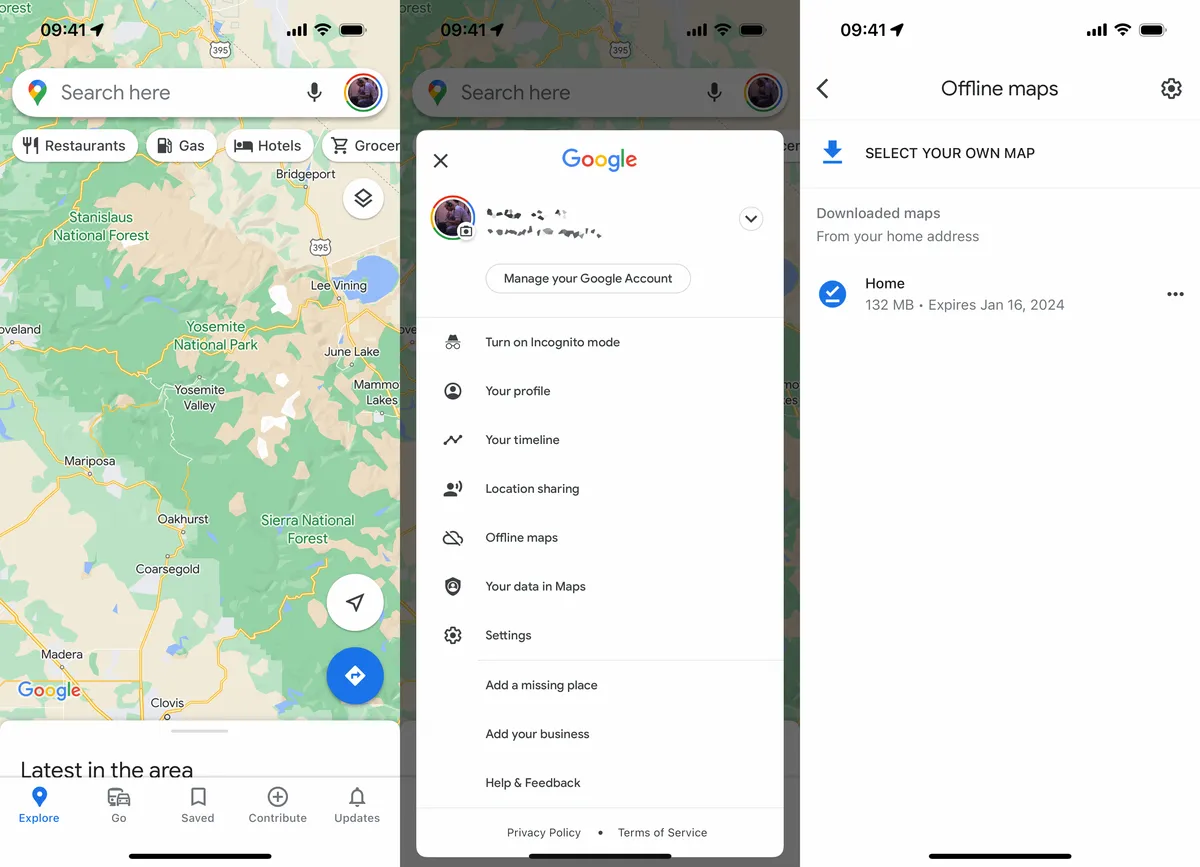
After downloading, your offline maps can be accessed and managed under the ‘Offline maps’ section in the menu. Here, you can see when each map was downloaded and when it expires (usually after 30 days without an update). You can also delete or update maps as needed.
3. Navigating with Offline Maps
When using offline maps, you can search for specific places, get driving directions, and find important information like business hours and contact details for millions of places. However, some features, such as real-time traffic updates and alternate routes, require an internet connection.
4. Limitations and Considerations
While offline maps are incredibly useful, they do have limitations. Walking, cycling, and transit directions are not available offline. Also, offline maps may not provide the same level of detail as their online counterparts, especially for less-popular areas.
5. Tips for Efficient Offline Navigation
- Plan Ahead: Before you go offline, plan your route and familiarize yourself with the area.
- Regular Updates: Keep your offline maps updated to ensure accuracy.
- Storage Management: Be mindful of your device’s storage capacity when downloading large maps.
6. Combining Online and Offline Features
For the best experience, combine offline and online features. For instance, use offline maps for basic navigation and switch to online mode for live traffic updates and detailed information when you have access to Wi-Fi or mobile data.
7. Safety and Preparedness
Having offline maps is also a matter of safety and preparedness. In case of emergencies, especially in unfamiliar or remote areas, having access to maps without relying on internet connectivity can be crucial.
Conclusion
Google Maps’ offline feature is a powerful tool that enhances our ability to navigate confidently, irrespective of internet connectivity. Whether you’re an avid traveler, a resident in an area with unreliable internet, or someone who likes to be prepared, understanding and utilizing offline maps in Google Maps ensures that you always have a reliable navigation aid at your fingertips. As technology evolves, we can expect even more advancements in offline navigation, making Google Maps an even more indispensable tool in our daily lives.